
Tag: tech tips

  • We all know MFA is important, but many users are expressing symptoms of “MFA fatigue”

    We all know MFA is important, but many users are expressing symptoms of “MFA fatigue”

    Multi-factor authentication, commonly called MFA, has become one of the most important protections a business can put in place. It helps stop attackers from getting into company accounts even when a password has been stolen, guessed, reused, or leaked in a breach. However, there is a real problem many businesses are running into: people are tired of MFA prompts.

    Employees are juggling email, Teams, payroll systems, accounting tools, CRMs, file sharing platforms, vendor portals, and remote access systems. When every app seems to ask for another code, another approval, or another phone notification, MFA can start to feel like a daily annoyance instead of an important security control.

    That frustration is understandable. But turning MFA off, weakening it, or only applying it to a few users is not the answer. The right answer is to build an MFA strategy that protects the business without making employees miserable. Passwords are no longer enough to protect business accounts. NIST notes that MFA adds protection by requiring more than just a username and password, using a combination of something you know, something you have, or something you are.

    For a small business, one compromised account can create a chain reaction. If an attacker gets into email, they may be able to reset passwords for other services, read invoices, impersonate executives, redirect payments, access sensitive files, or launch phishing attacks against clients and vendors. That is why MFA matters so much. It creates a second barrier between a stolen password and your business data.

    The problem is that not all MFA is equally strong. Microsoft has warned that traditional MFA methods like SMS codes, email one-time passcodes, and basic push notifications are becoming less effective against modern attackers, especially when attackers use phishing, social engineering, or MFA bombing to wear users down. In other words, the goal should not simply be “turn on MFA.” The goal should be to use the right kind of MFA in the right places.

    First let’s identify what we mean by “MFA fatigue”, MFA fatigue can mean two different things. first is normal user frustration. Employees get annoyed when they are prompted too often, especially if prompts feel random, repetitive, or disruptive.

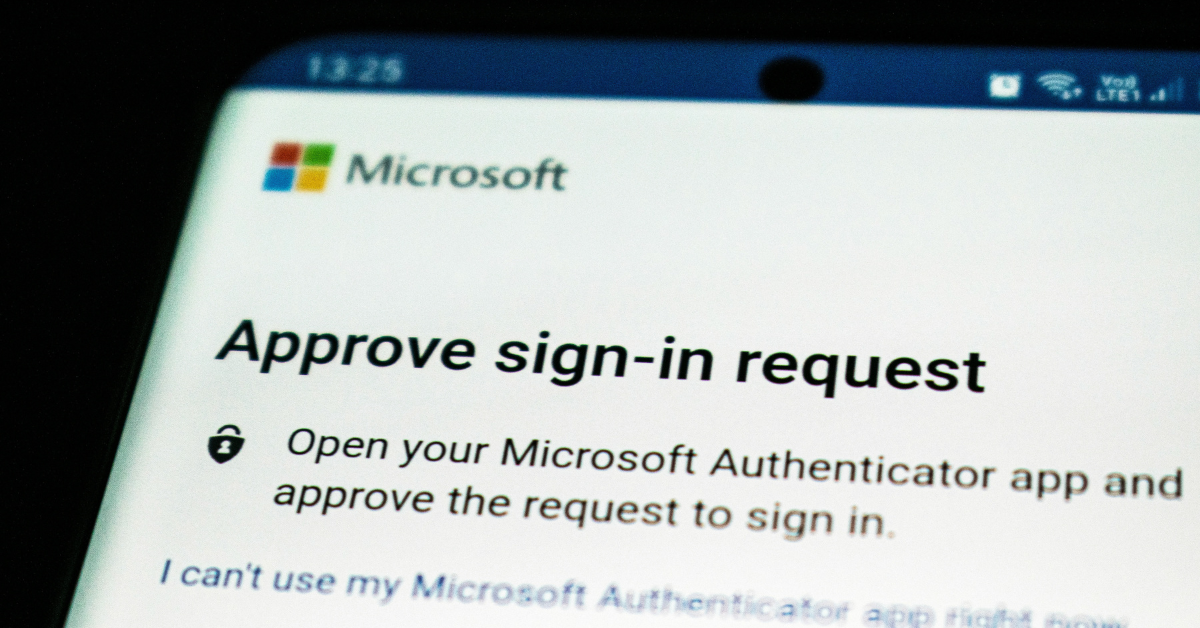
    The second is an actual attack technique. In an MFA fatigue or “push bombing” attack, a criminal already has the user’s password and repeatedly sends MFA approval prompts, hoping the user eventually taps “approve” just to make the noise stop. Microsoft specifically identifies user fatigue and MFA bombing as ways attackers bypass weaker authentication methods. This is why businesses need to treat MFA fatigue seriously. It is both a usability issue and a security issue.

    Some businesses technically have MFA enabled, but only in a limited or inconsistent way. That can create a false sense of security. Common issues include:

    • MFA is required for some employees but not all.
    • Admin accounts are not protected with stronger authentication.
    • Email-based MFA is used as the primary method.
    • SMS codes are allowed for sensitive accounts.
    • Employees receive push prompts without number matching or location context.
    • Legacy authentication methods are still allowed.
    • Former employees, contractors, or shared accounts are not reviewed.
    • MFA recovery processes are informal or undocumented.

    These gaps matter, attackers usually do not need access to every account. They only need access to one useful account. A compromised mailbox can lead to business email compromise, fraudulent payment requests, client impersonation, data theft, or ransomware. For businesses that work with regulated data, financial information, legal documents, healthcare information, or client confidential records, the risk is even higher.

    A good MFA strategy should be strong, simple, and consistent. It should protect the business while reducing unnecessary friction for users. First, require MFA for every user. MFA should not be limited to owners, managers, or employees who “handle sensitive information.” In a modern cloud environment, almost every account has some level of business risk.

    Second, prioritize stronger authentication methods. App-based MFA is better than SMS or email-based verification, but phishing-resistant methods are better still. Microsoft describes passkeys as phishing-resistant credentials that can serve as an MFA method, and notes that they can reduce prompts while improving security.

    For most small businesses, a practical MFA roll out path looks like this:

    1. Eliminate email-based MFA wherever possible.
    2. Move users to an authenticator app with number matching.
    3. Use passkeys or security keys for administrators, finance users, executives, and anyone with access to sensitive systems.
    4. Keep SMS only as a temporary fallback, not the preferred method.
    5. Document account recovery so users are not locked out when phones are replaced or lost.

    Microsoft also notes that number matching is critical to reducing accidental MFA approvals, especially as MFA fatigue attacks increase. The best MFA setup is not the one that prompts users constantly. The best setup is the one that prompts users when it actually matters.

    Small businesses can reduce MFA fatigue by using smarter access policies. For example, users may not need to be prompted every single time they access a trusted app from a managed device in a normal location. But they should absolutely be challenged when signing in from a new device, an unusual location, a risky session, or a sensitive admin portal. This is where conditional access policies can help. Instead of treating every login the same, conditional access allows the business to apply stronger controls based on risk.

    A good policy may consider:

    • Who the user is
    • What app they are accessing
    • Whether the device is trusted
    • Whether the sign-in location is expected
    • Whether the account has administrative privileges
    • Whether the session appears risky

    This gives employees a smoother daily experience while still applying stronger controls when the risk is higher. MFA is not just a technical setting. Employees need to understand what to do when they receive a prompt. The rule should be simple: never approve an MFA prompt you did not initiate.

    If an employee receives an unexpected MFA prompt, that may mean someone already has their password. They should deny the request and report it immediately. Users should not ignore it, approve it, or assume it is a glitch. Training does not need to be complicated. A short, clear explanation is usually enough:

    “MFA prompts should only appear when you are actively signing in. If you get a prompt you did not request, deny it and contact IT.” That one rule can stop a serious  incident.

    Also, Administrative accounts deserve extra protection. These accounts can often change security settings, reset passwords, access sensitive data, create new users, modify mail flow, and approve applications. For admin accounts, stronger MFA should be required. Passkeys, FIDO2 security keys, or other phishing-resistant methods are strongly preferred. NIST also recommends phishing-resistant authentication for sensitive applications and users with elevated privileges. Business owners, finance users, HR users, and anyone who can approve payments or access confidential client data should also be considered high-risk.

    Special consideration should also be taken when addressing new employees. MFA should be built into onboarding, role changes, and offboarding. When a new employee starts, they should be enrolled in the correct MFA method from day one. When someone changes roles, their access and authentication requirements should be reviewed. When someone leaves the company, their sessions should be revoked, their account should be disabled, and their access should be removed promptly.

    This is especially important for small businesses because responsibilities often overlap. One person may handle finance, HR, operations, and vendor relationships. That makes account security even more important.

    The bottom line is MFA fatigue is real. Employees are tired of excessive prompts, confusing login flows, and security tools that get in the way of work, but avoiding MFA is not a realistic option. The risk of account compromise, payment fraud, data theft, and business disruption is too high. The better approach is to modernize MFA. Require it consistently, move away from weaker methods, use phishing-resistant authentication where possible, reduce unnecessary prompts, and train users to recognize suspicious activity.

    Security should not feel like punishment. Done correctly, MFA can become a normal, low-friction part of doing business safely. If your business is still relying on passwords alone, email-based MFA, SMS codes, or inconsistent MFA policies, now is the time to review your setup. Valley Techlogic can help evaluate your current Microsoft 365 and cloud security configuration, identify gaps, and build an MFA strategy that protects your business without overwhelming your users. Learn more today with a consultation.

    This article was powered by Valley Techlogic, leading provider of trouble free IT services for businesses in California including Merced, Fresno, Stockton & More. You can find more information at https://www.valleytechlogic.com/ or on Facebook at https://www.facebook.com/valleytechlogic/ . Follow us on X at https://x.com/valleytechlogic

  • .corn or .com? Domain scams are getting trickier, here’s how you spot them

    .corn or .com? Domain scams are getting trickier, here’s how you spot them

    It starts with a single typo. You glance at a URL, it looks right, and you click. But what loaded in your browser wasn’t your bank, your HR portal, or your company’s file-sharing platform. It was a meticulously engineered trap, and the people behind it had been waiting for exactly this moment.

    Domain-based deception isn’t new. But the tactics have grown sharper, faster, and far more difficult to spot with the naked eye. With over 300 million registered domain names in the world and new top-level domains being approved at a pace that can be hard to follow, scammers have more raw material than ever to work with.

    Understanding their methods is the first step toward protecting yourself and your organization.

    The anatomy of a fake domain

    Before diving into specific tactics, it helps to understand what scammers are actually trying to do. Their goal is to create a web address that is visually close enough to a legitimate one that a busy, distracted reader won’t notice the difference. They then use that domain to host phishing pages, deliver malware, or intercept credentials.

    The deception typically targets three things: the domain name itself, the top-level domain (the part after the final dot), and the subdomain structure. Sometimes all three are manipulated at once.

    “The goal isn’t to fool careful readers. It’s to exploit the moments when no one is being careful.”

    Typosquatting is the practice of registering domains that are one small error away from a well-known name. A missing letter, a transposed pair, a repeated character. The domains are cheap to register and the potential return is enormous.

    Classic examples include swapping an “i” for an “l,” doubling a letter, or inserting a hyphen where none belongs. More recently, scammers have been exploiting the similarity between certain characters in different scripts, a technique sometimes called homograph or homoglyph spoofing.

    • Legitimate
    • microsoft.com
    • Typosquat
    • rnicros0ft.com
    • Legitimate
    • paypal.com
    • Typosquat
    • paypa1.com

    At normal reading speed, on a small screen, or while skimming an email on your phone, these are nearly indistinguishable. That’s precisely the point.

    The new TLD problem: .corn, .рaypal, and beyond

    For decades, the internet ran on a handful of top-level domains: .com, .net, .org, .gov. Users learned to treat those suffixes as rough signals of legitimacy. That mental shortcut is now being exploited.

    The Internet Corporation for Assigned Names and Numbers (ICANN) has approved hundreds of new generic top-level domains in recent years, including .app, .store, .finance, .cloud, and many more. Alongside these legitimate expansions, bad actors have been quick to spot and abuse visual lookalikes. The domain suffix .corn, for example, is close enough to .com that it has been used in phishing campaigns targeting users who click without examining the full address. Similarly, .co is a legitimate country-code domain for Colombia that has long been used, sometimes legitimately and sometimes deceptively, as a shorthand imitation of .com.

    Watch out for

    .corn instead of .com — a real top-level domain that reads as familiar at a glance.

    .co instead of .com — widely used in legitimate startups, but also a common phishing suffix.

    Internationalized domain names that use Cyrillic or Greek characters which render identically to Latin letters in many fonts.

    Subdomain manipulation, such as paypal.com.account-verify.net, where the real domain is the one after the final dot, not the one you recognize.

    One of the most effective and underappreciated techniques involves manipulating subdomains. Browsers display the full URL, but users have been trained to look for the familiar brand name, not to parse which part of the address actually controls the destination.

    A URL structured as amazon.com.account-secure.xyz places a recognizable brand in what looks like the domain, but the authoritative domain is account-secure.xyz. The scammer owns that, not Amazon.

    This technique is particularly effective in SMS phishing (smishing) attacks, where the entire URL is often truncated and users tap links quickly without examining them.

    Modern browsers support internationalized domain names, which means a domain can be registered using characters from non-Latin scripts. The problem arises when those characters are visually identical, or nearly so, to their Latin counterparts.

    The Cyrillic lowercase “а” and the Latin lowercase “a” look the same in most fonts. The Greek omicron “ο” is visually identical to the Latin “o.” By combining these characters, a scammer can register a domain that renders as “apple.com” in your browser’s address bar but resolves to an entirely different server.

    Browser vendors have implemented some defenses against the most obvious abuses of this technique, but protection remains inconsistent across platforms and character combinations.

    “When it comes down to it, you’re not reading the domain. You’re pattern-matching against a mental image of what it should look like.”

    What’s changed in the last two years is not just the cleverness of individual attacks but the speed and scale at which they can be deployed. Generative AI tools have made it substantially easier for even low-skill operators to spin up convincing phishing pages, generate personalized lure emails, and register dozens of lookalike domains simultaneously.

    So what can you do about it? Security researchers have observed campaigns where hundreds of typosquatted domains are registered in a single day, each pointing to a slightly different variant of a phishing page tailored to a specific target sector. Financial institutions, healthcare providers, and enterprise software platforms are the most frequent targets, but no industry is immune.

    The threat landscape is complicated, but the protective behaviors that matter most are straightforward. Most successful domain spoofing attacks succeed not because the victim was foolish but because the conditions for clicking without thinking were carefully engineered.

    Practical checklist

    • Hover over links before clicking to see the full destination URL, and read it from right to left, starting after the final dot.
    • Use a password manager that matches credentials to specific domains. If the URL is wrong, the manager won’t fill, which is your first warning.
    • Enable multi-factor authentication everywhere. A stolen password is far less useful when a second factor is required.
    • Treat any link sent via SMS, messaging apps, or email as suspect by default. Navigate to sensitive sites by typing the address directly or using bookmarks.
    • Report suspicious domains to your IT or security team. Early detection of a campaign targeting your organization can protect colleagues who haven’t seen it yet.

    Domain-based attacks are successful because they exploit something deeply human: the tendency to use heuristics rather than careful analysis when under time pressure or cognitive load. Scammers are not usually trying to outsmart technically sophisticated users in their most alert moments. They’re engineering the conditions under which even careful people make mistakes.

    The defensive answer is partly technical, partly procedural, and partly cultural. Security-aware organizations train people to slow down at the moment of a click, not just to use the right tools. That pause, the habit of looking twice at a URL before entering credentials, is often the difference between a near miss and a breach.

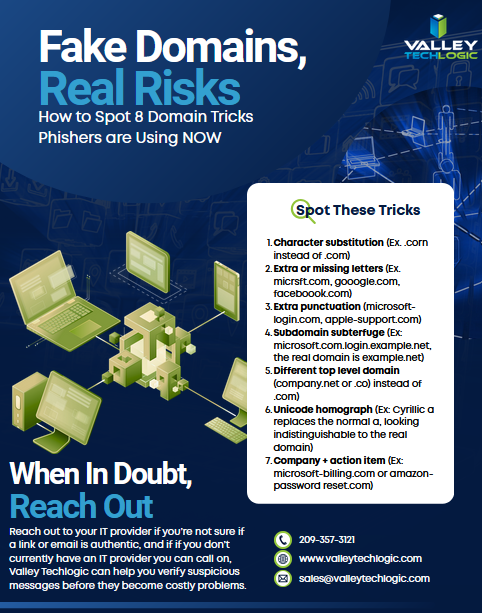
    The next time a link looks almost right, trust that instinct. Almost right is how these attacks work, and education on this topic is the best way to stop scammers in their tracks. Below is a free resource on this topic to share with your team:

    For specific guidance on protecting your organization, consult a qualified cybersecurity professional. If you need assistance in administering cyber security services (including Security Awareness Training) within your organization, Valley Techlogic can help. Learn more today through a consultation.

  • Technology Planning for 2025: Five Items to Focus on to Grow Your Business in the New Year

    Technology Planning for 2025: Five Items to Focus on to Grow Your Business in the New Year

    It’s November and 2025 is just two short months away, we don’t know about you but for us it felt like 2024 flew by and in that time technology planning for our clients has already changed.

    For example, 2025 will bring the end-of-life date for Windows 10 which is still dominating the market share of Windows devices at 65%. We have also more clients in introducing AI into their business next year, including taking advantage of Microsoft’s Co-Pilot which works in tandem with their existing Microsoft subscriptions (you can see our latest blog on AI here).

    Beyond AI or replacing hardware, what are five ways you can grow your business with technology in 2025? Here’s our suggestions:

    1. Implement a Customer Relationship Management (CRM) System
      A CRM platform (e.g., Salesforce, HubSpot or Keap) helps centralize customer interactions, sales data, and service requests, providing valuable insights into customer preferences and buying behavior. By integrating CRM across your sales, marketing, and service teams, you can improve customer retention, streamline communication, and create targeted marketing campaigns that drive growth.
    2. Leverage Automation to Streamline Operations
      Automating routine tasks such as invoicing, customer service, and lead generation can free up your team to focus on strategic work. Automation tools like RPA (Robotic Process Automation) and workflow automation software can improve efficiency, reduce human error, and cut costs.
    3. Adopt Cloud Solutions for Greater Flexibility and Collaboration
      Cloud-based tools (like Microsoft 365 or Google Workspace) enable teams to collaborate in real-time, regardless of location. They offer flexible storage, data security, and remote access to essential resources, which can increase productivity and support a hybrid workforce.
    4. Boost Marketing Reach with Advanced Analytics
      Using data analytics platforms (e.g., Google Analytics 4, Tableau) lets you gain deeper insights into customer behavior, optimize campaigns, and track ROI. Predictive analytics can also help anticipate customer needs, allowing for proactive engagement and more efficient targeting.
    5. Invest in Cybersecurity to Build Trust and Prevent Losses
      Protecting sensitive customer and business data is vital. Implementing multi-factor authentication (MFA), endpoint security, and regular audits can reduce the risk of data breaches. Prioritizing cybersecurity can build customer trust, prevent financial losses, and safeguard your company’s reputation.

    If you’re looking to increase your technology prowess in 2025, Valley Techlogic is the partner you’re looking for. We stay ahead of advancements in IT to give our customers the best strategic advantage over their competitors. We also have an offer for new customers that you won’t want to miss, see the details below.

    Looking for more to read? We suggest these other articles from our site.

    This article was powered by Valley Techlogic, leading provider of trouble free IT services for businesses in California including Merced, Fresno, Stockton & More. You can find more information at https://www.valleytechlogic.com/ or on Facebook at https://www.facebook.com/valleytechlogic/ . Follow us on Twitter at https://x.com/valleytechlogic and LinkedIn at https://www.linkedin.com/company/valley-techlogic-inc/.

  • 7 Gadgets you shouldn’t leave home without this Holiday Season

    7 Gadgets you shouldn’t leave home without this Holiday Season

    The holidays are truly upon us and for many of us that means traveling to friends and family and enjoying some time spent away from work and in our loved one’s company.

    However, for business owners being on the go doesn’t mean the work stops and we often carry our work devices with us to keep a watchful eye on things even from afar. We have 7 gadget recommendations that can facilitate working on the go or keeping in touch with those you’ve left in charge as you try to unwind a bit this holiday season.

    Our 7 tech gadget recommendations will make traveling with your tech easier on the go.

    1. Luggage trackers: The first step is making sure your tech makes it to your target destination, and luggage trackers will help you keep track of your belongings while you’re on the go. We recommend Tile Pro for Android users and AirTags for Apple. These trackers use Bluetooth to communicate to other devices in the area and will pinpoint the location of your luggage should you lose track of it. Our Recommendation: Airtag and Tile Pro.
    2. Battery banks: Another way to make working on the go easier is having additional battery power at your fingertips, battery banks are inexpensive and can power multiple devices simultaneously. Our Recommendation: Anker Magnetic Battery 5,000 mAH
    3. Portable monitors: Portable monitors have come a long way, for $200 or less you can get a decent secondary monitor that will make working away from your home office much more convenient. Our Recommendation: UPERFECT Portable Monitor
    4. Cord organizing case: We have all pulled out a knot of cables we then have to untangle before we can begin charging our travel depleted devices, there is a better way. Our Recommendation: MATEIN Cable Organizer Bag
    5. Laptop stand: In another effort to bring the comforts of home with you we recommend a good quality laptop stand that will make working on whatever open surface you can find much more pleasant. Our Recommendation: OMOTON Ergonomic Laptop Riser
    6. Privacy screen: If you’re planning to work in any public spaces this holiday season you might want to consider a privacy screen, this will make it so passersby’s can’t take a peek at what you’re doing and most of them reduce blue light as well. Our Recommendation: Acer 2-Way Privacy Filter
    7. Portable door lock: If your travel plans involve a hotel or shared AirBNB we recommend adding additional protection with a portable door lock. This will keep out unexpected and uninvited guests and leave any belongings you might have in your room (such as your laptop) more protected. Our Recommendation: Winchy Portable Door Lock

    Tech advice like this is just one of the services we provide to our customers, and right now we’re offering $100 just for meeting with us and hearing about our services. Time is running out on this offer, click this link or on the image below to get started.

    Looking for more to read? We suggest these other articles from our site.

    This article was powered by Valley Techlogic, an IT service provider in Atwater, CA. You can find more information at https://www.valleytechlogic.com/ or on Facebook at https://www.facebook.com/valleytechlogic/ . Follow us on Twitter at https://x.com/valleytechlogic.

  • Traveling for the holidays? Take 8 tech tips from our experts with you

    Traveling for the holidays? Take 8 tech tips from our experts with you

    If you’re traveling the holidays this year, we have eight tech tips to help you stay safe while using your devices on the go.

    We’ve offered holiday themed tech advice before (here are a couple of our past articles on the top 10 Holiday Shopping Tips for Safer Online Shopping & 5 Holiday Tips for Your E-Commerce Business and 5 for Everyone Else). The holidays usually mean more time off which can lead to more time spent browsing the web or being able to work on things in your business you usually don’t have time for.

    It’s also a good idea to keep in mind that bad actors don’t typically take the holidays off, in fact ransomware attacks usually increase by 30% on the holidays. That’s because many people are keeping an eye out for sale emails or emails from relatives this time of year – giving more opportunities for scammers and bad actors to take advantage of folks just looking for a good deal or a message from their loved ones.

    Traveling especially can leave you more vulnerable, if you’re quickly scanning messages in-between flight connections, logging into public WiFi or any number of things that are a normal part of being on the go you can miss some obvious red flags.

    That’s why we’re going to divide up our advice into 4 tips that are related to being safer online while traveling, and 4 tips for improving your technology experience while traveling.

    First our safety themed tips:

    1. As we mentioned, be careful on public WiFi. Nowadays, even if you need to use your laptop the better option might be to use your phone as a hotspot. If you do need to connect to public Wi-Fi, consider doing it through a VPN. We can personally recommend Mullvad which is not subscription based, one payment will get you online through a secure connection without having to remember to cancel it later.
    2. Be careful about what you’re posting on social media. Posting travel photos for your friends and family to see can be really fun, but you should be wary about who else might be watching. It’s a good idea to make your social media profiles private but if you maintain a public presence, you can also think about posting those photos after your trip has concluded instead.
    3. Public charging stations can also pose a risk. Unfortunately, these stations can be tampered with and become an attack vector to everyone who uses them. Battery banks are pretty inexpensive these days and even more convenient when you’re on the go.
    4. Don’t leave your items unattended. Just as airport personnel will ask if your suitcases have been in your possession the whole time, it’s a good idea to keep track of your belongings from a tech standpoint as well. Someone with bad intent might not be after your device when your data is much more valuable.

    Now for our convenience themed tips:

    1. Keep track of your belongings on the go with an Apple Airtag, Tile Pro or other bluetooth based trackers. A misplaced bag can ruin your vacation, having one of these trackers inside it will prevent that from happening.
    2. Turn any audio jack into a Bluetooth wireless transmitter. Whether you rent a car without a Bluetooth adapter or you want to use your Bluetooth headphones on the plane, a wireless Bluetooth transmitter is a gamechanger. Best of all many options are on sale at the moment for Black Friday, we’ve personally used the Anker Soundsync. It’s small so it won’t take up much room in your bag and as 12 hours of run time per charge.
    3. We mentioned using your phone as a mobile hotspot up above, but if your data plan is not the best you can also purchase a standalone mobile hotspot (with a data package included). This can also be a gamechanger if your network Isn’t going to be stellar where you’re going, you can purchase a mobile data plan for a network that has coverage instead. T-Mobile, AT&T and more all have options for this.
    4. Having to work on the go but don’t want to drag your whole setup with you? Consider a portable monitor. If you’ve gone to two (or more) monitors at work you know there’s no going back, but sometimes travel includes doing some work out on the road and bringing your at home setup is not going to be an option. Portable monitors often come with a travel ready case and can be connected to your laptop via USB-C (both for power and display), bringing you the convenience or two displays without the headache of trying to travel with a full-size monitor.

    Technical advice like this is one of the advantages of being a Valley Techlogic customer, and for a limited time if you meet with us about our services, we will give you $100 cash just to hear us out.

    What do you have to lose? Schedule a consultation today.

    Looking for more to read? We suggest these other articles from our site.

    This article was powered by Valley Techlogic, an IT service provider in Atwater, CA. You can find more information at https://www.valleytechlogic.com/ or on Facebook at https://www.facebook.com/valleytechlogic/ . Follow us on Twitter at https://x.com/valleytechlogic.

  • Our Top 10 Technology Myths and Urban Legends, Debunked

    Our Top 10 Technology Myths and Urban Legends, Debunked

    The advent of the internet brought an influx of information right to our fingertips, and unfortunately not everything that proliferates on the internet is factual.

    With “fake news” undoubtedly being one of the official buzz word phrases of the 2020’s, how close are you reviewing these common place technology tropes? These are the top 10 technology myths and urban legends we see as a technology provider:

    1. Privacy/Incognito mode is DEFINITELY private: We’re sorry to say, if you think everything you’re doing in a private/incognito browser is hidden from view you would be incorrect. The way this mode works is it hides your browsing history from other people who may use your computer, but your ISP definitely can still see what you’re doing and depending on what’s been set up at work, possibly your IT Team/employer as well.
    2. Leaving your phone plugged in destroys your battery: Nope this one is also false, we’re not sure how the idea of “over charging” a battery came to be but there’s zero evidence that leaving your phone or laptop on a charger for an extended period of time will have a long-term effect on your device’s battery.
    3. At the same time, don’t let your device die completely before charging it: Letting a battery discharge completely before charging it again will not improve your phone’s battery life. Just charge your devices when they need a charge and let these myths about batter life go.
    4. Mac/Linux devices (basically anything not Windows) are virus proof: Nope again, the bad news is if a device has access to the internet, it’s going to be a target for hackers. If even your smart fridge Isn’t safe, what makes you think any computer or cellphone would be?
    5. Force killing apps save resources and speeds up your computer: If you have ever opened your computers task manager you’ve probably seen a lot of processes running, and you may have even force closed some of these processes to “speed” up your computer. It doesn’t really work that way unfortunately, many of the processes you see are background processes that your computer needs to run. Your computer will just open them again automatically, effectively making this activity a waste of time. You can, however, close applications you’re not using the regular way (and if you’re still having issues, it might be time to look at upgrading your device).
    6. Full bars mean the best service: We’ve heard it time and again, “I have four bars!” someone will exclaim, indicating that their cellphone service has reached its full potential. More bars just mean stronger signal strength, but unfortunately for you if you’re in a heavily populated urban area it means you’re sharing that same strong signal strength with everyone else in the area. Mobile service, just like any other internet service, is subject to bandwidth load so even with a strong signal you may still experience slow service depending on where you are and how many other people are around.
    7. You shouldn’t shut your computer down at night: This is another head scratcher for us, but we still see folks who believe they shouldn’t shut their computer down when they walk away for the evening. We’re happy to report that shutting down your computer will not harm it, in fact reducing the load on it each day by turning it off at night may even extend the life of your device.
    8. Magnets will wipe your data/destroy your device: There’s a little bit of truth to this one but it’s run amok for so long that the truth has been obfuscated for most folks – we’re happy to report your device will NOT be destroyed by a common refrigerator magnet. However, a really big industrial magnet could do some damage, so we suggest not placing your computer near one of those.
    9. Cellphones etc. can give you cancer: Nope, this one has been completely debunked. The radiofrequency that is emitted by your cellphone, tablet, laptop etc will NOT give you cancer.
    10. I’m a small business/single person, no hacker will bother with me: This is unfortunately, quite untrue. It’s estimated half a million U.S. accounts are hacked each day – many of these are just regular folks or small business owners like yourself.

    We hope this article helped in quashing some of these myths for you but if you have any other technical urban legends you’re not sure about, we’d be happy to weigh in (just jump on our live chat and ask away!).

    If the last one was a scary one for you and you’re a business owner in California, Valley Techlogic can assist. We provide cyber security services for our clients that make sure they won’t be part of that frightening statistic. Learn more through a consultation today.

    Looking for more to read? We suggest these other articles from our site.

    This article was powered by Valley Techlogic, an IT service provider in Atwater, CA. You can find more information at https://www.valleytechlogic.com/ or on Facebook at https://www.facebook.com/valleytechlogic/ . Follow us on Twitter at https://x.com/valleytechlogic.

  • Reddit experienced a major outage yesterday, and our 5 tips for what to say to customers when your website goes down

    Reddit experienced a major outage yesterday, and our 5 tips for what to say to customers when your website goes down

    Reddit was down for several hours yesterday due to an “internal systems issue”. While the mobile version of the site fluctuated between being semi usable to being completed down, the desktop version was unusable for nearly five hours.

    Outages like this that occur to major website are a newsworthy event, as users flock to social media to report the outage and speculate on the cause. A fix was implemented and the site slowly came back up just before 7:30 PM Eastern Standard Time. By the time it was back up it had already been reported on by major tech news sites such as the Verge, Apple Insider, TechCrunch and more.

    We’ve discussed outages before on this site because as we just said, they’re newsworthy events, but what about when your company’s website goes down?

    It might be less news worthy than Facebook, Reddit, Amazon, Twitter etc. having an outage but depending on the type of business you’re in it may still be noticeable to your customers if your website has a major outage.

    When something goes wrong there’s often a knee jerk reaction to move along and pretend it never happened, but outages these days often go hand in hand with cyber threat events and moving along mums the word may leave your customers with the wrong idea (and rightfully concerned).

    If you’re in a business sector that saves customer data at all, and there aren’t many that aren’t, it’s always good to be transparent when you have a major outage. Even if your website was down briefly it still might have been noticed by some and it’s best to keep ahead of the rumor mill.

    Here are our five tips for what to say to your customers when your website experiences an outage:

    1. If the outage is ongoing, update your social media. Customers often look to your social media pages for news about your business and this will be the first place many will check to find out what’s going on. You don’t have to cover everything about the outage, a summary of what’s happening and that you’re aware of it will be enough.
    2. Let your customers know how they can reach if you needed (especially if going through your website is how customers usually contact you). Having an email address available specifically for customer concerns is a good idea.
    3. Also send an email proactively, especially if the outage extends longer than a day. Not every user will check social media, sending an email covers the rest of your digital bases for letting customers know.
    4. Be sure to post an update when the issue is resolved. Again, it’s best to stay ahead of your own narrative for outages within your business, posting an update and a brief description of what the issue was is a good idea.
    5. Finally, if your outage was the result of a breach, follow state and country guidelines for notifying customers of any data leaks that may have occurred.

    Your business reputation can be affected by major outages, we wrote an article on how to protect your reputation and recover. You can find it here.

    Providing advice like this is a service that comes with being a Valley Techlogic customer, here are four other benefits to being a Valley Techlogic customer.

    4 Reasons to Choose Valley TechlogicReach out today to learn more.

    Looking for more to read? We suggest these other articles from our site.

    This article was powered by Valley Techlogic, an IT service provider in Atwater, CA. You can find more information at https://www.valleytechlogic.com/ or on Facebook at https://www.facebook.com/valleytechlogic/ . Follow us on Twitter at https://x.com/valleytechlogic.

  • 5 Holiday Tips for Your E-Commerce Business and 5 for Everyone Else

    5 Holiday Tips for Your E-Commerce Business and 5 for Everyone Else

    It doesn’t matter which e-commerce sector you’re in, the holiday time period is always a big opportunity to increase that year’s sales before the New Year rolls in.

    With online shopping growing in popularity year over year there are specific ways to capture more of that online market – especially around the holidays.

    Here are 10 tips for improving your sales during the holiday season (including 5 that apply to all types of business):

    1. Step up your social media game. Anecdotal evidence from us, when we went from posting inconsistently 3-4 times a week to posting consistently 4-5 times a week our impressions didn’t just go up, they doubled. The holidays are a great time to post more updates about your business on your social media platforms.
    2. Make sure your contact information is rock solid. It would be a tragedy to see sales calls go unanswered, make sure the contact information on your website it up to date and your sales people are ready to answer those calls.
    3. Make sure your website it mobile friendly. This may be a tough one to knock out this year if you haven’t done it yet, but having a mobile friendly website is a must have in 2023. Google even offers a free tool for testing if your website is mobile friendly here.
    4. Release holiday ads. During the holiday season your same old ads may not perform as well as a holiday themed one would as people look for those familiar colors and settings (red and green, blue and white, snow and Christmas trees).
    5. Take advantage of marketing automation. Facebook for example lets you schedule posts and you can update your Google advertising with your holiday messaging and let it run.
    6. If you plan on conducting a big sale, make sure your website is ready for it. If you’re planning on running any holiday “one day sales” make sure your website can handle the potential increased traffic or there’s a game plan in place for if it goes down so you don’t lose your momentum. You can check on your current page speeds with this other Google tool here.
    7. Have a chatbot available. You might get the same questions repeatedly, having an automated chatbot that can answer those questions with the same feel as a sales representative could increase your sales.
    8. Improve your holiday key words ahead of time. If you’re an apparel company for example peppering “holiday themed apparel” or “Chrstimas outfits” into your SEO keyword efforts is a good idea leading up to the holiday season.
    9. Have a holiday themed front page. We’ve talked about having holiday themed ads and social media posts but you should also “dress up” your front page temporarily to clue buyers in that you’re ready for the season. Many website providers have the option of changing out a front page temporarily so you can easily switch it back when the season is over.
    10. Make sure your buyers know any email marketing is from you. Phishing scams also increase in the holidays, having ways for a buyer to tell emails sales are from your company and not from a scammer is key. Mirror any sales you have directly on your website as well.

    Speaking of holiday phishing scams, here is an infographic on avoiding holiday scams:

    Click to grab the full size version.

    Whether your business is e-commerce or something else entirely, Valley Techlogic can assist with your technology needs in 2023. We have our own holiday sale going on now that will even save your company money on IT support in the new year. Reach out today to learn more!

    Looking for more to read? We suggest these other articles from our site.

    This article was powered by Valley Techlogic, an IT service provider in Atwater, CA. You can find more information at https://www.valleytechlogic.com/ or on Facebook at https://www.facebook.com/valleytechlogic/ . Follow us on Twitter at https://x.com/valleytechlogic.

  • Winamp is BACK again, and our 3 best Windows media player recommendations

    Winamp is BACK again, and our 3 best Windows media player recommendations

    If you came of age in the 90’s to early 2000’s then you probably have fond memories of Winamp (short for Windows Advanced Multimedia Products).

    Released in 1997 it was the dominant music player for a while on PC, having 3 million downloads by 1998. With fun features such as music visualization and the ability to change “skins” it was one of the most downloaded software for Windows devices for a few years.

    Winamp in 2022
    Winamp looks the same today as it did 20 years.

    Skins and visualizations were just two of the popular “plugin” modules that could be downloaded, it could also be used as a media library and had the ability to add album art to help you sort your music. Remember having a plethora of MP3s on your PC before services like Spotify and Apple Music existed?

    Winamp has passed through a number of owners over the years, with updates stopping in 2013 under parent company AOL as streaming music rose in popularity. It’s now owned by Radionomy and it’s first update in 4 years has just been released to the public.

    Whether it sees success riding a wave of nostalgia during a time when 90s era clothing and branding seems to be making a comeback is yet to be seen, but we were excited to give it a try. Their new website is sleek and modern but we’re happy to report the application still feels the “same as it ever was” (another throwback for you guys).

    If you clicked on this article, you may be wondering what’s available for media players on Windows besides the default – Groove music for well, music and Windows Media Player for video.

    As no muss no fuss options those are fine but there are media players out there that will expand your capabilities, allowing you to stream the same content across multiple devices – even your TV.

    Here are our top 3 picks:

    1. Plex – Plex not only allows you to stream your own media for free across devices, including TV, PC, Android and Apple, they also have on demand content and even live TV.
    2. VLC Media Player – Open source and cross device, this lightweight media player often has support for file types the others fail to play, especially useful for playing subtitles in a variety of languages.
    3. Kodi – Another free media player option, this one is unique in that it works on Raspberry Pi devices, making it a good choice for helping you set up an inexpensive media playing platform for your television even if it’s not a “smart” tv.

    Click to grab the full size version.

    While this topic falls outside our normal wheelhouse we wanted to touch on it and offer our advice on safe picks for media players. It’s always a good idea to do your research when downloading any software. Here is our three-step guide for what you should do with any newly downloaded executable file:While Valley Techlogic can’t help you with your media playing setup at home, we can help you navigate software choices for your business. Set up a consultation with us today to learn more.

    Looking for more to read? We suggest these other articles from our site.

    This article was powered by Valley Techlogic, an IT service provider in Atwater, CA. You can find more information at https://www.valleytechlogic.com/ or on Facebook at https://www.facebook.com/valleytechlogic/ . Follow us on Twitter at https://x.com/valleytechlogic.

  • 5 of the Most Important Cybersecurity Training Topics to Cover with Your Employees

    5 of the Most Important Cybersecurity Training Topics to Cover with Your Employees

    We’ve discussed cybersecurity training before and its importance in preventing the number 1 cause of cybersecurity disasters – human error.

    We offer cybersecurity training as a core feature in our tech care plans, but many topics you can (and should) cover yourself with your employees. There couple be rules that specifically apply to your business sector; like HIPAA for healthcare or CMMC for Department of Defense contractors.

    Maybe you’ve experienced a cybersecurity attack before and after the dust settled you came up with a game plan specifically to prevent it from happening again. If it hasn’t happened to you yet, it’s a mistake to assume it never will. In 2021 42% of businesses experienced a cyberattack. It’s a numbers game most won’t win without preventions in place.

    To start, we want to offer these posters we’ve created on two common cybersecurity threat topics, email and malicious attachments. These posters are free for you to print and brand to use in your office or send as a reminder, and these are two excellent places to start when you’re looking to beef up your office security.

    Click to grab the full size version.

    Click to grab the full size version.

    Here are five more training topics all workplaces should also cover:

    1. Like our posters above, email security and having strict guidelines for attachments and downloads is one key thing to focus on in your cybersecurity training efforts.
    2. It’s also important to provide guidance for internet usage while at work. Many employers try to digitally lock this down, but these efforts are usually met with annoyance and disdain from employees and are often in vain. Instead of arbitrarily trying to block everything with software we suggest having guidance about what’s appropriate for work devices (and what Isn’t). We also suggest noting that even if a website looks legitimate it may not be, so they should be wary of sites that ask you to download something or enter private credentials.
    3. This comes to the next topic which is practicing good safety hygiene with work devices. Three easy steps are: Locking your computer when you walk away, only downloading software from work authorized sites, and keeping your device up to date with patching and software updates. They may need assistance with the third step so it’s a good idea to have your IT provider manage workstations if you’re able to (this is something Valley Techlogic providers for all clients).
    4. The fourth step is protecting company data. If you’re employees have to interact with documents that are confidential in nature you should have rules for the sharing of those documents, as well as a comprehensive plan for backing them up safety.
    5. Finally, you should provide guidance on passwords and multi-factor authentication. Having a rule in your workplace that for work accounts they must have multi-factor enabled (or have your IT team enable it across the board) will drastically improve your office’s online safety. We have guidance for this topic here.

    It can feel overwhelming to have all of these topics to cover with your employees, but we cannot overstate how important it is to cover these topics with your employees, even if you think they’re things they should already “know”.

    At Valley Techlogic we have partnered with a platform that not only provides cybersecurity training resources, but it also allows you the ability to create your own training modules. You can even cover topics that fall outside the cybersecurity spectrum. We can also work with your business to assist you in the creation of these training modules, if you would like to learn more schedule a consultation with our sales manager Annette today!

    Looking for more to read? We suggest these other articles from our site.

    This article was powered by Valley Techlogic, an IT service provider in Atwater, CA. You can find more information at https://www.valleytechlogic.com/ or on Facebook at https://www.facebook.com/valleytechlogic/ . Follow us on Twitter at https://x.com/valleytechlogic.